


Description
Download Video Maker Movie Editor APK – video editing, mobile video editor, home movies, quick video creation, Android app
Overview
Video Maker Movie Editor is a mobile desktop application designed for on-the-go video editing on Android devices. It enables users to create polished home videos by combining clips, images, and audio tracks using a streamlined interface. The software addresses the growing need for accessible video editing tools that allow users to refine raw footage captured with smartphones and tablets. Its primary purpose is to simplify the process of assembling short videos without requiring advanced technical skills or desktop software.
Target users include casual content creators, social media users, families documenting events, and individuals who want to quickly produce shareable videos without investing time in complex editing workflows. While the developer is not specified in the provided information, the app’s design suggests a focus on user accessibility and intuitive navigation. Real-world usage scenarios include editing birthday moments, travel highlights, or event recordings directly from a mobile device, making it ideal for users seeking a lightweight solution for immediate video output.
Although the app does not support desktop environments, its mobile-first approach aligns with the increasing capabilities of modern smartphone cameras. The software allows users to import media from local storage, apply basic edits, and export final projects as MP4 files. This makes it a practical tool for creating quick, presentable videos without the need for a computer.
Key Features & Capabilities
- Single Timeline Editing: Users can place multiple video clips and images on a unified timeline, enabling straightforward sequencing and arrangement of content.
- Clip Trimming: Each clip can be shortened by dragging its edges, allowing precise control over the start and end points of recorded footage.
- Drag-and-Drop Reordering: Clips can be repositioned on the timeline by dragging them to new locations, facilitating easy rearrangement during the editing process.
- Fade and Transition Effects: Tap the end of a clip to apply fade-ins, fade-outs, or cross-dissolve transitions, helping to smooth out abrupt cuts.
- Audio Integration: Users can import background music or soundtracks and synchronize them with video content.
- On-the-Go Media Capture: The app supports creating new video or photo content directly within the application using the device’s camera.
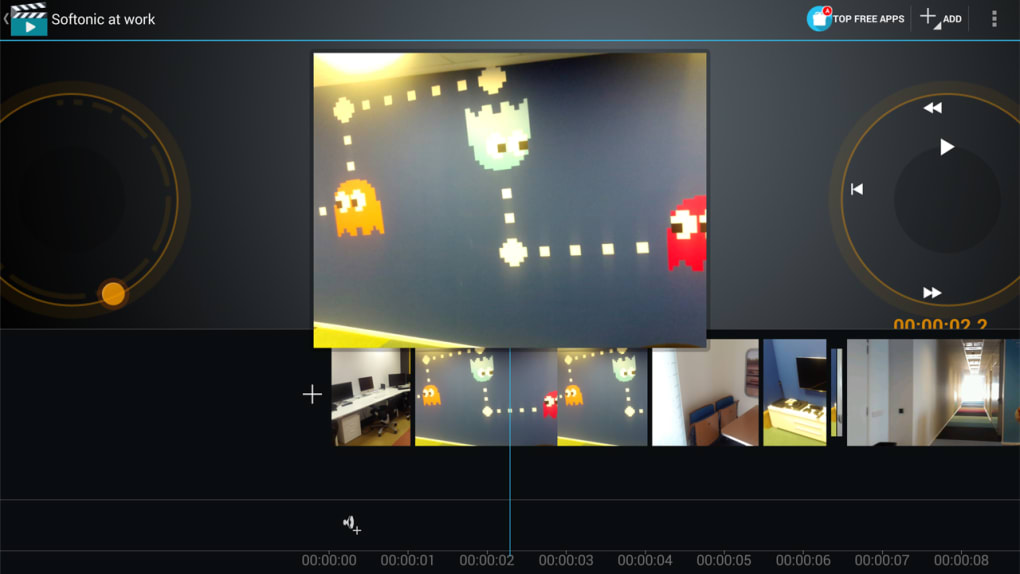
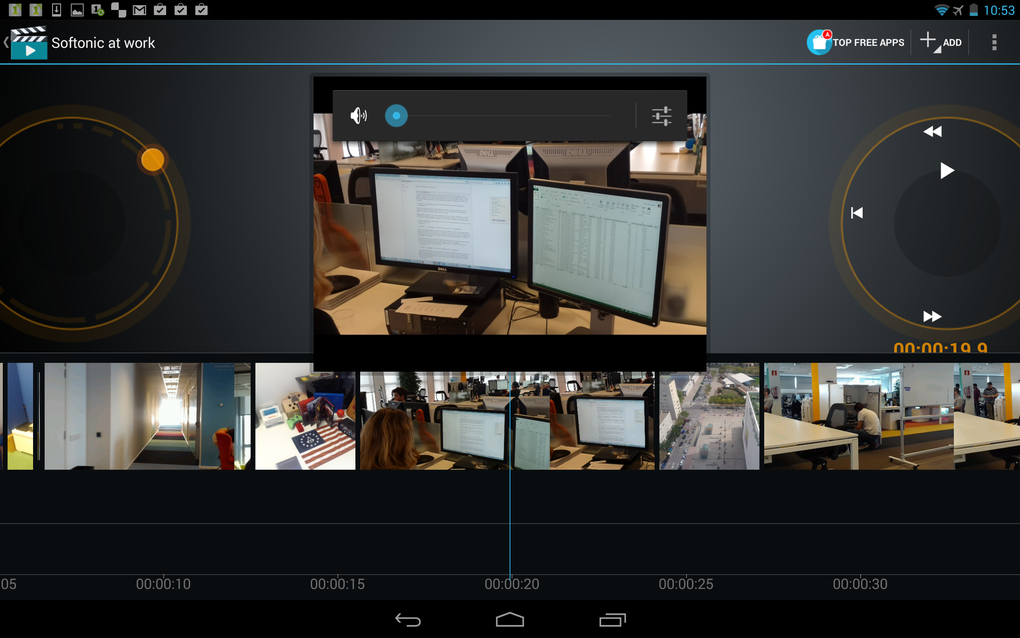
- Real-Time Preview: The current scene remains centered on screen during editing, allowing for instant visual feedback and review of changes.
- MP4 Export: Final projects can be rendered and saved as standard MP4 video files for sharing or archiving.
These features are particularly useful for users who want to quickly assemble event footage, remove unwanted segments, or enhance visual flow with simple effects. For example, a user might trim a video of a child’s first steps to include only the successful moment, add a fade-out effect, and overlay a personal soundtrack—all within minutes.
User Interface, Workflow & Performance
The user interface of Video Maker Movie Editor is built around a clean, two-thumb touchscreen layout optimized for mobile use. The timeline is positioned at the bottom of the screen, regardless of device orientation, ensuring consistent access during editing. The playback and scrub controls are conveniently placed beneath the right thumb, enabling smooth navigation through the video timeline.
On larger devices like tablets, a zoom function is available under the left thumb, allowing users to expand or compress the timeline view for more precise editing. This feature enhances workflow efficiency when working with longer or complex sequences. The central display area consistently shows the current scene being edited, enabling real-time visual assessment of changes without switching views.
While specific performance metrics such as CPU or RAM usage were not provided, the software operates within the typical behavior of lightweight mobile applications. It is designed to run efficiently on standard Android devices without requiring high-end hardware. Stability during editing sessions appears to be consistent, though exact behavior may vary depending on device capabilities and media file sizes. The developer did not specify resource usage details.
Compatibility & System Requirements
Video Maker Movie Editor is designed for Android devices and is available as an APK file for direct installation. The app supports mobile platforms with Android operating systems, though the exact version range is not specified. Installation size is not provided in the input, so users should expect typical app storage requirements based on device capabilities.
Hardware requirements were not detailed in the provided information. However, the app’s lightweight nature suggests compatibility with most modern Android smartphones and tablets. The developer did not provide additional system requirements. Users are advised to ensure their device meets general Android app compatibility standards before installation.
Pros and Cons
Pros
- Simple, intuitive interface ideal for beginners and casual users
- Efficient workflow with drag-and-drop and timeline-based editing
- Real-time preview helps users visualize edits instantly
- Supports on-the-fly media capture using the device’s camera
- Free to download and use with optional in-app purchases
- Exports final videos as standard MP4 files for broad compatibility
Cons
- Limited to mobile platforms; no desktop version available
- Basic feature set compared to professional desktop editors
- Some imported media may require manual re-import after capture
- Exact performance and system requirements not disclosed
- Advanced editing tools such as keyframing or color grading are not available
FAQ Section
Is Video Maker Movie Editor available for Windows or Mac?
The software is designed exclusively for Android devices and is not available for Windows or Mac operating systems.
Is the app safe to download and install?
As a mobile application distributed via APK, users should ensure the source is trusted. The developer did not provide security details, so it is recommended to download from official or verified platforms.
Does the app require an internet connection?
Basic editing functions can be performed offline. However, some features like cloud sync or in-app purchases may require an internet connection.
Can I update the app after installation?
Updates are available through the official distribution channel. Users should check for updates regularly to access new features and improvements.
What type of license does Video Maker Movie Editor use?
The app is free to download and use, with optional in-app purchases to unlock additional features. No subscription model was specified.
Final Thoughts + CTA
Video Maker Movie Editor offers a compelling solution for users seeking a fast, accessible way to edit videos directly from their Android devices. While it lacks the depth of professional desktop software, it delivers a polished, user-friendly experience tailored for casual creators. Its emphasis on simplicity, real-time preview, and seamless media integration makes it ideal for producing home videos, social media clips, or quick mock-ups on the go.
Although the app has limitations in terms of advanced editing tools and cross-platform availability, its strengths lie in ease of use and immediate results. For individuals who value speed and convenience over complexity, this tool provides everything needed to create shareable content without the learning curve of traditional video editors.
Download Video Maker Movie Editor now
Guides & Tutorials for Video Maker Movie Editor APK
How to install Video Maker Movie Editor APK
- Click the Preview / Download button above.
- Once redirected, accept the terms and click Install.
- Wait for the Video Maker Movie Editor APK download to finish on your device.
How to use Video Maker Movie Editor APK
This software is primarily used for its core features described above. Open the app after installation to explore its capabilities.
User Reviews for Video Maker Movie Editor APK 0
No reviews found





